为什么选择 TypeScript
JavaScript 的痛点
JavaScript 作为动态类型语言,在大型项目开发中存在明显短板:
作用域问题:ES5 及之前的var存在变量提升和函数级作用域隐患
类型安全缺失:无类型检测机制,错误只能在运行时发现
数组设计缺陷:早期 JS 数组内存空间不连续,影响性能
示例:JS 类型隐患的 TS 模拟(无类型约束场景)
1
2
3
4
5
|
function getStrLen(str: any) {
return str.length;
}
getStrLen(8);
|
TypeScript 的核心价值
TypeScript(简称 TS)是 JavaScript 的超集,官方定义为:
“TypeScript = JavaScript + 类型系统 + 最新 ECMAScript 特性”
核心优势:
编译时类型检查,错误提前暴露(编码时→编译时→运行时)
完全兼容 JS,所有.js 文件可直接作为.ts 文件使用
开源维护,由微软持续迭代
支持大型项目:Angular、Vue3、VSCode、Ant-Design 等均采用 TS 开发
环境搭建与运行
安装 TypeScript
1
2
3
4
5
|
npm install typescript -g
tsc --version
|
运行 TS 代码的方式
编译为 JS 后运行
1
2
3
|
tsc xxx.ts
node xxx.js
|
使用 ts-node 直接运行
1
2
3
4
5
6
|
npm install ts-node -g
npm install tslib @types/node -g
ts-node xxx.ts
|
集成 Webpack(适用于前端项目)
通过 webpack 配置 ts-loader 或 babel-loader,实现 TS 自动编译打包,配置示例:
1
2
3
4
5
6
7
8
9
10
11
12
13
14
15
|
module.exports = {
module: {
rules: [
{
test: /\.tsx?$/,
use: 'ts-loader',
exclude: /node_modules/
}
]
},
resolve: {
extensions: ['.tsx', '.ts', '.js']
}
};
|
核心语法与实操
基础类型定义
TS 支持 JavaScript 原有类型,并新增类型注解语法:
1
2
3
4
5
6
7
8
9
10
11
12
13
14
|
let str: string = 'vintor';
str = '123';
let num: number = 18;
let isShow: boolean = true;
const company: string = 'ctrip';
|
特殊类型:any
当变量类型无法确定时使用any,但实际开发中建议少用:
1
2
3
4
5
6
| let name: any = "Vintor";
name = 18;
name = { age: 18 };
let arr: any[] = ['Vintor', 18, true];
|
枚举类型(enum)
用于定义一组固定的取值集合,支持字符串和数字类型:
1
2
3
4
5
6
7
8
9
10
11
12
13
14
15
|
export enum COINS_STATUS {
IN_USE = 'IN_USE',
NOT_USED = 'NOT_USED',
DISABLED = 'DISABLED',
NOT_SHOW = 'NOT_SHOW'
}
const currentStatus: COINS_STATUS = COINS_STATUS.IN_USE;
console.log(currentStatus);
|
接口定义(interface/type)
用于描述对象的结构,两种定义方式的核心用法:
基础用法对比
1
2
3
4
5
6
7
8
9
10
11
12
13
14
15
16
17
18
19
|
type InfoType = {
name: string;
sex?: string;
readonly age: number;
};
interface InfoInterface {
name: string;
sex?: string;
readonly age: number;
}
const info1: InfoType = { name: 'Vintor', age: 18 };
const info2: InfoInterface = { name: 'Man', sex: 'male', age: 20 };
|
定义函数类型(type 专属)
1
2
3
4
5
6
7
8
9
|
type CalFunc = (num1: number, num2: number) => number;
const add: CalFunc = (a, b) => a + b;
const multiply: CalFunc = (a, b) => a * b;
console.log(add(2, 3));
console.log(multiply(2, 3));
|
可选类型与空值处理
类似 Swift 的可选类型,防止空值导致的运行时错误:
1
2
3
4
5
6
7
8
9
10
11
12
13
14
15
16
|
interface User {
name: string;
age?: number;
}
function getAge(info?: User): number {
return info?.age || 0;
}
console.log(getAge());
console.log(getAge({ name: 'Vintor' }));
console.log(getAge({ name: 'Vintor', age: 18 }));
|
泛型(Generic)
解决代码复用和类型安全问题,支持多种类型的通用逻辑:
1
2
3
4
5
6
7
8
9
10
11
12
13
14
15
16
17
18
19
20
21
22
23
|
function getType, E>(arg1: T, arg2: E): [T, E] {
return [arg1, arg2];
}
const result1 = getType('Vintor', 18);
const result2 = getTypeVintor', true); // [string, boolean]
// 泛型接口
interface ResponseData {
code: number;
data: T;
message: string;
}
// 应用示例
const userResponse: ResponseData {
code: 200,
data: { name: 'Vintor', age: 18 },
message: 'success'
};
|
泛型命名规范(不成文约定):
T:Type(类型)
K/V:Key/Value(键值对)
E:Element(元素)
O:Object(对象)
元组(Tuple)
用于存储不同类型的固定长度数据集合,常用于函数返回值:
1
2
3
4
5
6
7
8
9
10
|
const userInfo: [string, string, number] = ['Vintor', 'male', 18];
const name = userInfo[0];
const gender = userInfo[1];
const age = userInfo[2];
const stringArr: string[] = ['a', 'b', 'c'];
|
联合类型(Union)
允许变量取值为多个类型中的任意一种:
1
2
3
4
5
6
7
8
9
10
11
12
13
14
15
16
|
type CalType = number | string;
function calculate(num1: CalType, num2: CalType): number {
if (typeof num1 === 'number' && typeof num2 === 'number') {
return num1 + num2;
} else if (typeof num1 === 'string' && typeof num2 === 'string') {
return parseFloat(num1) + parseFloat(num2);
}
return 0;
}
console.log(calculate(1, 3));
console.log(calculate('1', '3'));
|
类型断言
用于明确指定变量的类型,类似类型转换:
1
2
3
4
5
6
7
8
9
10
11
12
|
const anyValue: any = 'Vintor';
const strValue = anyValue as string;
console.log(strValue.toUpperCase());
const numValue = 8;
const optionalValue: string | undefined = 'Hello';
const sureValue = optionalValue!;
console.log(sureValue.length);
|
函数重载
解决联合类型在函数中的复杂判断问题,提供更精准的类型提示:
1
2
3
4
5
6
7
8
9
10
11
12
13
14
15
16
17
18
|
function calculate(num1: number, num2: number): number;
function calculate(num1: string, num2: string): number;
function calculate(num1: number | string, num2: number | string): number {
if (typeof num1 === 'number' && typeof num2 === 'number') {
return num1 + num2;
} else if (typeof num1 === 'string' && typeof num2 === 'string') {
return parseFloat(num1) + parseFloat(num2);
}
return 0;
}
calculate(1, 3);
calculate('1', '3');
|
实用工具类型
TS 内置多种实用工具类型,简化类型定义:
1
2
3
4
5
6
7
8
9
10
11
12
13
14
15
16
17
18
19
20
21
22
23
24
25
26
27
28
29
30
31
32
|
interface User {
id: number;
name: string;
email: string;
age?: number;
}
type PartialUser = Partial
type ReadonlyUser = Readonly<User>;
const user: ReadonlyUser = { id: 1, name: 'Vintor', email: 'test@ctrip.com' };
type UserBasicInfo = Pick' | 'name'>;
// UserBasicInfo = { id: number; name: string }
// 4. Omit:排除部分属性
type UserWithoutId = Omit 'id'>;
// UserWithoutId = { name: string; email: string; age?: number }
// 5. Record:构建键值对类型
type PageInfo = Recordhome' | 'about' | 'contact', { title: string }>;
const pageConfig: PageInfo = {
home: { title: '首页' },
about: { title: '关于我们' },
contact: { title: '联系我们' }
};
|
项目配置:tsconfig.json
TS 的核心配置文件,控制编译行为:
1
2
3
4
5
6
7
8
9
10
11
12
13
14
| {
"compilerOptions": {
"target": "ES2020",
"module": "ESNext",
"strict": true,
"esModuleInterop": true,
"outDir": "./dist",
"rootDir": "./src",
"skipLibCheck": true,
"forceConsistentCasingInFileNames": true
},
"include": ["src/**/*"],
"exclude": ["node_modules", "dist"]
}
|
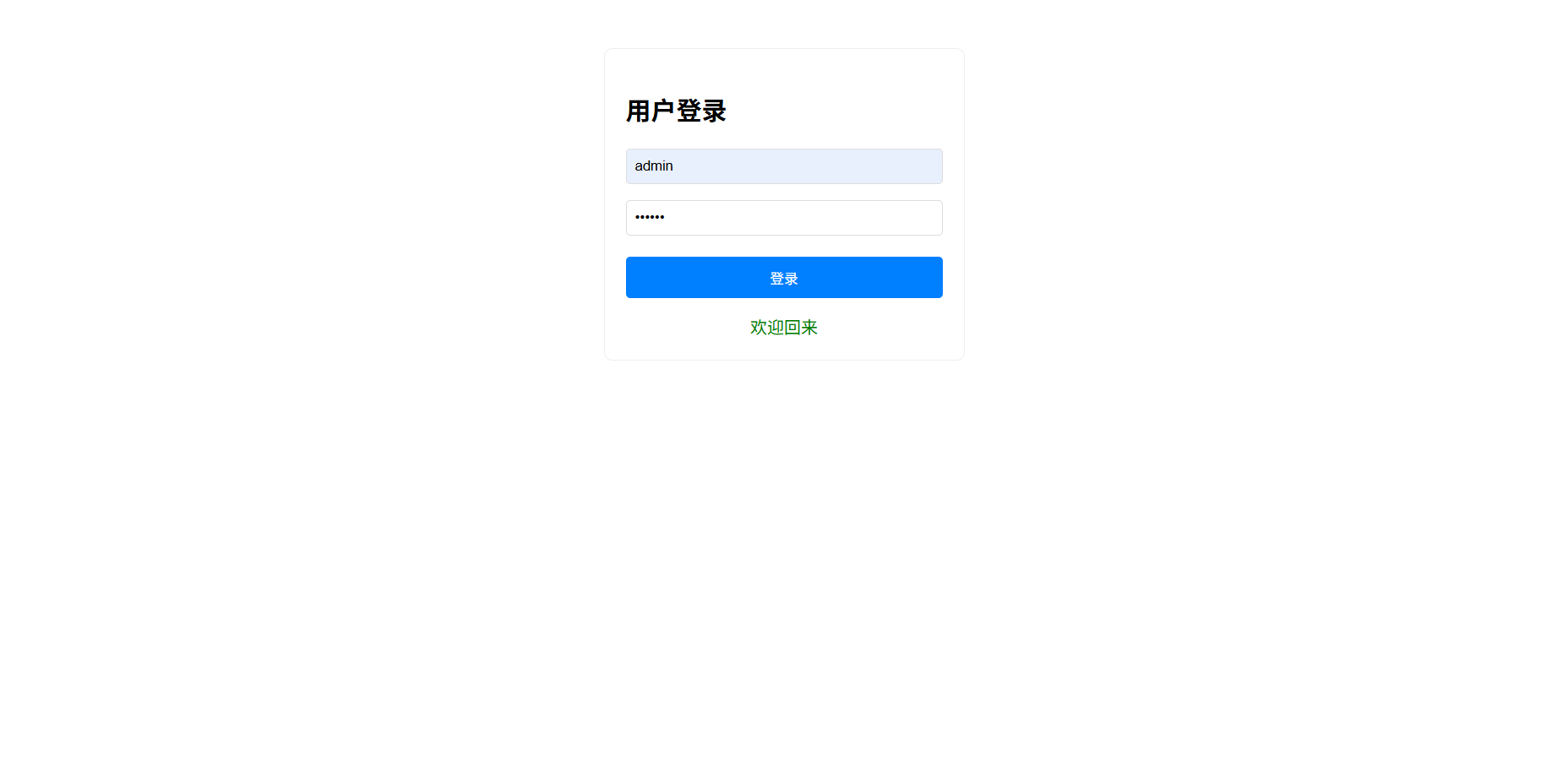
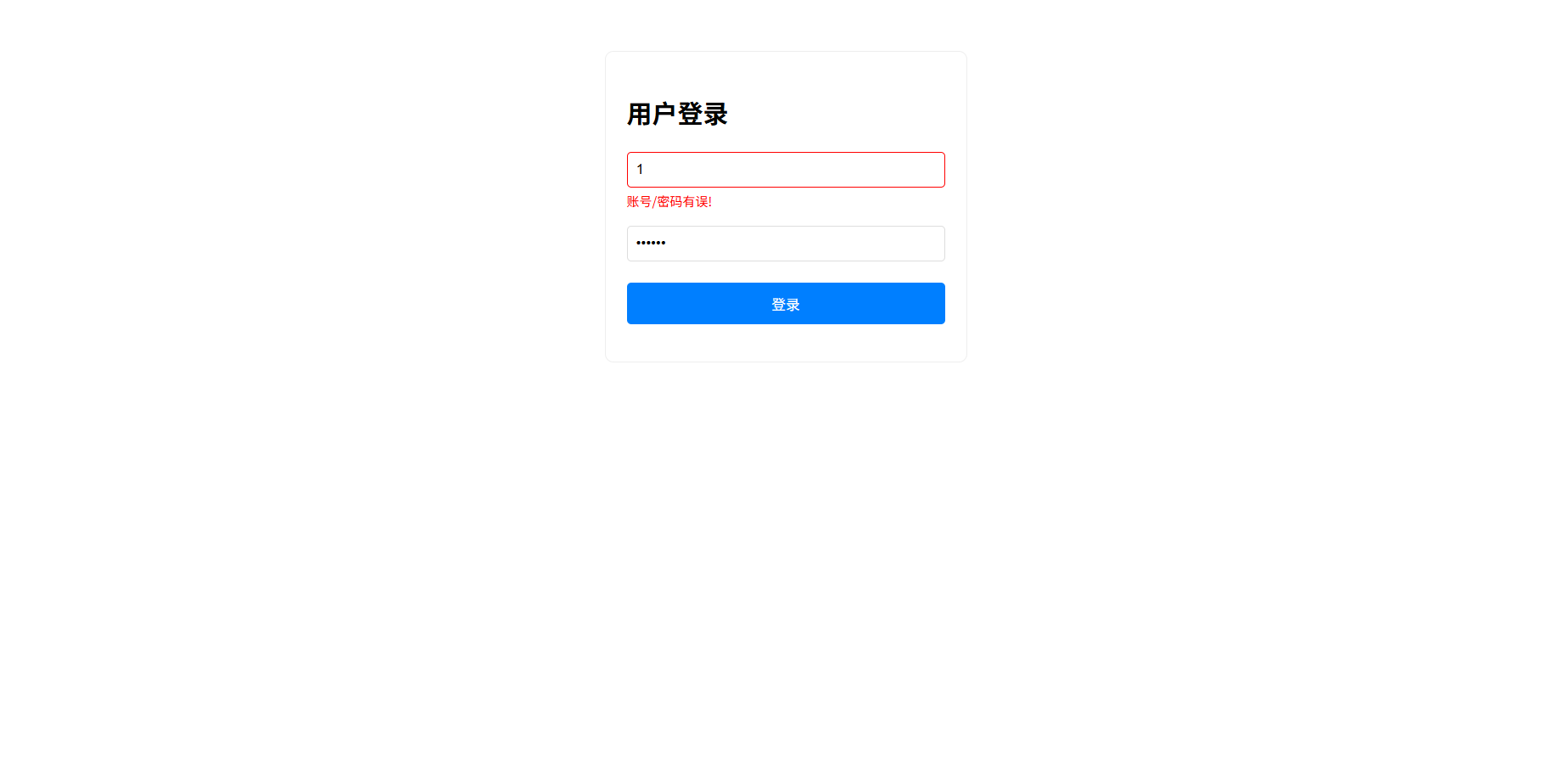
实战案例:TS 实现登录页面
需求分析
完整代码实现

1
2
3
4
5
6
7
8
9
10
11
12
13
14
15
16
17
18
19
20
21
22
23
24
25
26
27
28
29
30
31
32
33
34
35
36
37
38
39
40
41
42
43
44
45
46
47
48
49
50
51
52
53
54
55
56
57
58
59
60
|
document.addEventListener('DOMContentLoaded', () => {
const usernameInput = document.getElementById('username') as HTMLInputElement;
const passwordInput = document.getElementById('password') as HTMLInputElement;
const loginBtn = document.getElementById('loginBtn') as HTMLButtonElement;
const usernameError = document.getElementById('usernameError') as HTMLSpanElement;
const passwordError = document.getElementById('passwordError') as HTMLSpanElement;
const successMsg = document.getElementById('successMsg') as HTMLDivElement;
const validateRules = {
username: (value: string): boolean => {
const reg = /^[a-zA-Z_][a-zA-Z0-9_]{0,11}$/;
return reg.test(value);
},
password: (value: string): boolean => {
const reg = /^.{1,8}$/;
return reg.test(value);
}
};
loginBtn.addEventListener('click', () => {
const username = usernameInput.value.trim();
const password = passwordInput.value.trim();
let isInvalid = false;
usernameInput.classList.remove('invalid');
passwordInput.classList.remove('invalid');
usernameError.textContent = '';
passwordError.textContent = '';
successMsg.textContent = '';
if (!validateRules.username(username)) {
usernameInput.classList.add('invalid');
usernameError.textContent = '账号/密码有误!';
isInvalid = true;
}
if (!validateRules.password(password)) {
passwordInput.classList.add('invalid');
passwordError.textContent = '账号/密码有误!';
isInvalid = true;
}
if (!isInvalid) {
successMsg.textContent = '欢迎回来';
}
});
});
|
账号和密码并没有固定值,也没有和后端数据交互。只要账号和密码格式符合校验规则即可登录成功:
- 账号要求:1-12位,字母或下划线开头,可包含字母、数字、下划线。例如:user_1、_abc、A123
- 密码要求:1-8位任意字符。例如:123456、abc、!@#aBc
学习路线与资源推荐
学习路径(建议周期)
基础阶段(1-2 周):类型系统、接口、类、基础语法
进阶阶段(2-3 周):泛型、高级类型、装饰器、工具类型
实战阶段(1-2 个月):React/Vue + TS 项目开发、Node.js + TS 后端开发
推荐资源
官方文档:TypeScript 官网(最权威)
练习平台:TypeScript Playground(在线编写运行 TS)
开源项目:Vue3 源码、Ant Design 源码(学习实战应用)
书籍:《Effective TypeScript》(进阶必备)
社区支持:Stack Overflow 的 TypeScript 标签,GitHub 的 DefinitelyTyped 项目(类型声明库),TypeScript 中文网(中文资源汇总)